
To practice piano with a metronome, choose a tempo slow enough to play a short section without stopping. Play it with the click, and raise the tempo only after it stays steady. Most learners start too fast. The other problem is that it is hard to hear your own timing while you play, so this guide also shows you how to check it.
Before the click: count and tap
A metronome reminds you where the beat is. It does not build the pulse for you. Yamaha’s guide to rhythmic accuracy advises teachers not to reach for it first, because an unsteady pulse often starts away from the keys.
So count “1, 2, 3, 4” aloud and tap your thigh on each number for a few bars. Then start the click and keep counting. If this is new, try these three rhythm exercises first.
How to practice with a metronome, step by step
- Pick one short section. One or two bars is enough, and the hardest bars are the best place to begin.
- Find a tempo you can play without stopping. The Eastman Community Music School guide starts well below the marked tempo: for a piece marked 120, it begins at 60. If you still stumble, go slower.
- Listen first. Let the click run for one bar while you count, then come in on beat 1.
- Stay with the click. When you drift, stop. Find the bar where it happened and repeat only that bar.
- Raise the tempo in small steps. Add a few BPM after two clean rounds. That rule is our suggestion, not a standard. If the section falls apart, go back to the last tempo that felt easy.
- Keep it short. The Eastman guide suggests about 5 minutes for early sessions, with a break when you feel frustrated.
Set your tempo by the hardest bar, not the easiest one. The Eastman guide warns against playing faster than your hardest measure, and it names two common timing errors to watch for: cutting long notes short, and shortening or skipping rests.
How to tell if your tempo is steady
Recording yourself helps, because you can listen back without also playing. Compare the start and the end of the section: if the end sounds faster, you sped up. A recording does not show which notes were early or by how much, and this is why we built a free tool for it.
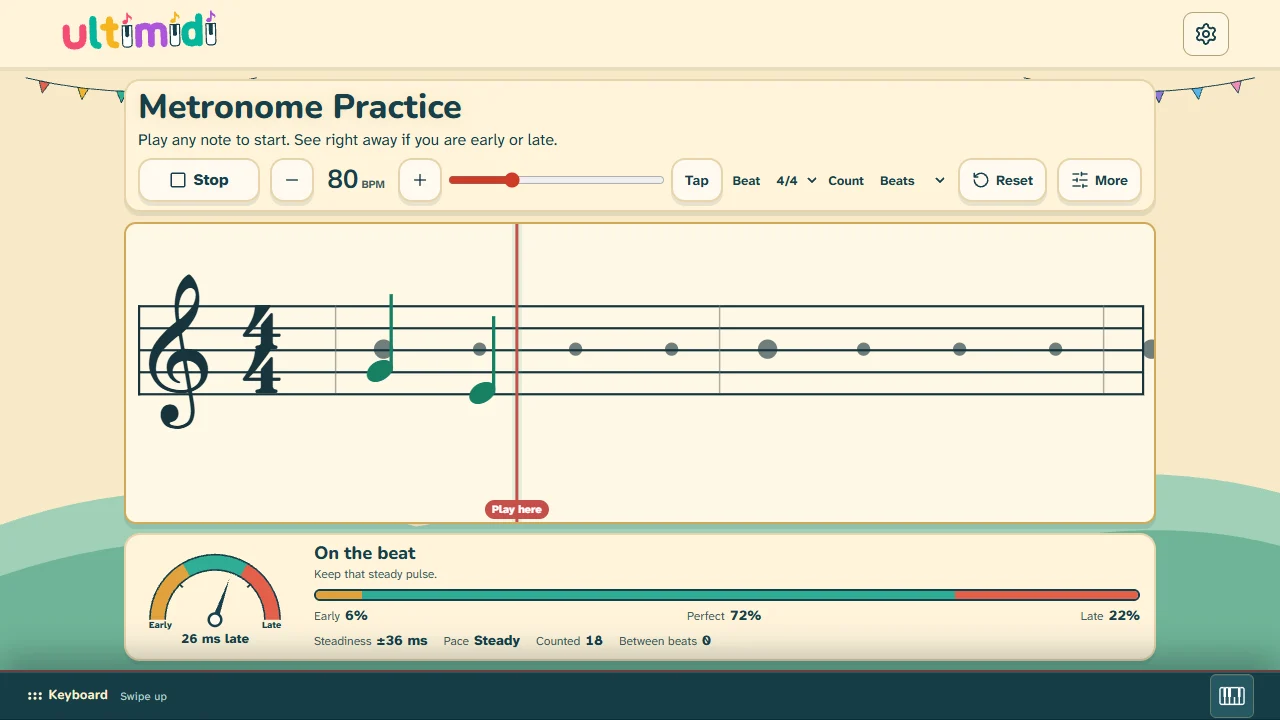
Metronome Practice runs in your browser with no account. Choose a tempo and a beat, then press Start or play any note. After the one-bar count-in, play any notes. Pitch is not judged, so you can use one key, a scale or your piece. Each note stays on the scrolling staff where it landed, and the gap from its beat dot is your timing error.
You can play with the screen piano or your computer keys. A MIDI keyboard needs a browser with Web MIDI. Can I use lists Chrome, Edge, Samsung Internet and desktop Firefox as supported on 31 October 2026, and Safari and iPhone browsers as not supported. For an acoustic piano there is a microphone Beta. We have not tested its timing on every piano and room, so treat its numbers as a rough guide.
What your result means and what to do next
| You see | It usually means | Try this |
|---|---|---|
| Mostly early | You arrive ahead of the click. | Lower the tempo a little and count aloud. Wait for the click, and do not lead it. |
| Mostly late | You may be reacting to the click and not expecting it. | Rest your finger on the next key before the beat, then play with the click. |
| Timing varies | Your notes fall on both sides of the click. | Slow down and play one repeated note until the steadiness number shrinks. |
| Pace: Speeding up | Each note lands earlier than the one before. | Repeat two bars. Check long notes and rests first, because cutting them short pulls you ahead. |
| Pace: Slowing down | The section may be too hard at this tempo. | Set the tempo by your hardest bar and work up from there. |
| Many notes “between beats” | You are playing faster notes than the count. | Change Count to Eighths. Faster notes stay out of the percentages. |
Perfect means within 40 ms of the click by default. You can choose Relaxed (70 ms) or Strict (25 ms). These are our practice settings, not a research standard, so do not chase 100%. A rising Perfect share and a smaller steadiness number at the same tempo are better signs than a single high score.
If it says you are late but you feel on time, check your audio first. Speakers and headphones can delay the click, especially over Bluetooth, and a browser’s figure for that delay is only an estimate. Try wired audio. The tool’s Align my ears option measures the delay from your tapping, but it also removes your own habit of playing early or late, so use it only for a real delay.
A 10-minute tempo session
| Time | Do this |
|---|---|
| 1 minute | Count aloud and tap with the click. |
| 3 minutes | Play one key on every click at an easy tempo. Watch the dial. |
| 4 minutes | Play your hardest two bars slowly, then repeat at a few BPM faster if they stay steady. |
| 2 minutes | Turn the click off and play the same bars. Listen for the pulse you just practiced. |
For a wider structure, use the 10-minute practice plan.
Should you always play with a metronome?
No. Yamaha’s guide says plainly that the metronome is not a cure-all. In our view, music also needs room to breathe, which a click cannot teach. Use the click to check your pulse and learn a steady tempo, then turn it off and play the music. A timing score is a clue about one practice run, not a judgment of your playing.
For this guide, we tested the tool with computer keys, touch and simulated MIDI in a browser. We did not test it with a physical piano or speakers, so we cannot give you a delay figure for your own setup.