
MIDI is information about a performance, not a recording of its sound. A keyboard can send which key you press, how firmly you press it and when you release it. An instrument or app turns those messages into sound. This is the distinction in the MIDI Association’s overview.
This guide covers instruments, cables and device compatibility. For the exact game controls, use Connect a MIDI keyboard to Ultimidi.
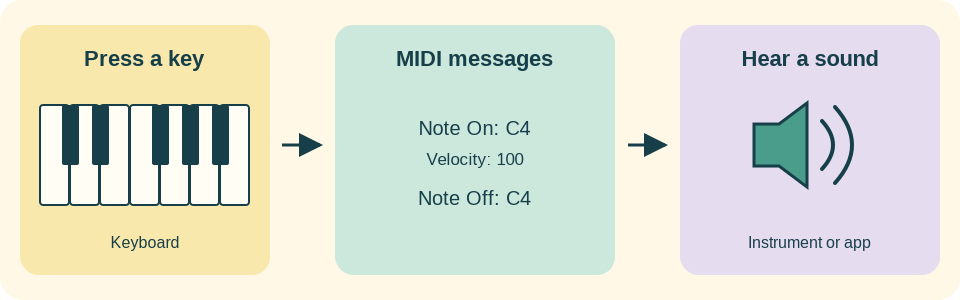
What happens when you press a key?
A Note On message identifies the note and its velocity. Releasing the key sends Note Off. Pedals and other controls have their own messages. Velocity usually affects loudness or tone; the receiving instrument decides how. See the MIDI message guide.
A MIDI controller may need a computer, tablet or sound module to make sound. A digital piano can have its own speakers as well as MIDI. Sending MIDI to an app does not automatically send the piano’s recorded audio.
Which cable do you need?
- USB MIDI: use the instrument’s USB-to-host port and a data cable that fits your device. A charge-only cable cannot carry the notes.
- Five-pin MIDI: connect the keyboard’s MIDI OUT to a MIDI interface’s MIDI IN. The interface connects to your computer.
- Headphone or audio output: carries sound, not MIDI note messages. An audio cable alone cannot tell a learning app which keys you pressed.
USB needs a host device, and class-compliant MIDI equipment can use the operating system’s MIDI driver. Some instruments need their manufacturer’s driver. Check the model’s manual before buying a cable or adapter. The MIDI Association’s connection guide explains these paths.
Device support and browser support are separate
A MIDI keyboard can work with a native music app while a browser on the same device cannot access it. Android has a native MIDI API; Apple documents Bluetooth MIDI in GarageBand for iPad. Neither proves that a web game can read the keyboard.
Web MIDI requires a supporting browser and site permission over HTTPS. Chrome, Edge, Opera and Samsung Internet support it on supported platforms. Firefox 108+ uses a site-permission add-on prompt. Safari and the usual iPhone/iPad browsers lack built-in Web MIDI. Check MDN’s current browser table for your platform.
On Android, the phone or tablet must support USB host/OTG. You may need an OTG adapter or a powered hub. A USB-C socket alone does not establish compatibility. Google explains the USB host hardware requirement.
Three keyboard options to consider
These are manufacturer-based suggestions, checked 17 October 2026. We have not physically tested these models with Ultimidi. Check your device, required cable, driver and return policy. Prices and included accessories vary.
| Use | Model and verified features | Trade-off |
|---|---|---|
| Compact controller | Arturia MiniLab 3: 25 velocity-sensitive slim keys; USB-C MIDI connection. | Fits a small desk. The short range needs octave changes and limits wider piano parts. |
| Full-size beginner keyboard | Yamaha PSR-E383: 61 full-size touch-sensitive keys; USB-to-host MIDI/audio. | More room for songs and its own sounds. It is a portable keyboard rather than a weighted piano action. |
| Weighted digital piano | Roland FP-10: 88-key PHA-4 Standard action and USB MIDI. | Better suited to long-term piano practice if its size, weight and cost suit your space. |
For piano practice, prioritize a comfortable action, usable key range and velocity sensitivity. Extra pads and knobs do not replace those. You can try Ultimidi with touch or computer keys before buying an instrument.
Why does my sustain pedal work backwards?
First check whether the problem occurs in the keyboard’s own sound, in music software, or in both. Use the instrument’s manual to confirm the pedal socket, compatible pedal and startup procedure.
For instruments covered by Yamaha’s reversed-pedal guidance, turn the keyboard off, unplug and reconnect the pedal, then turn it on with your foot off the pedal. Pressing it during startup can reverse its operation.
That sequence is not a universal reset. Arturia’s model-specific instructions cover pedal polarity switches and MIDI Control Center settings; some controllers also provide calibration. Follow the steps for your exact controller and pedal.
If the pedal works with the instrument but not in one app, check that app’s pedal support and mapping separately. A successful MIDI note test does not prove sustain support. Avoid a factory reset as a first step: it can erase saved settings or data.
Why does one app call middle C C3 and another C4?
MIDI note 60 is middle C, but octave labels can differ between devices and apps. Apple’s Logic Pro note-event guide describes C3 and C4 conventions and its display setting.
If your software shows MIDI note numbers, compare those before changing transpose settings. The same note number with a different octave label is a naming difference. If the same key sends a different note number, check the keyboard’s octave or transpose setting using its manual. Do not transpose solely to make two labels match.
Ready to use it in Ultimidi?
Follow the game MIDI setup guide for the connection button, live keyboard list, note test and troubleshooting. Then use the 15-minute piano exercise to practise.
To try MIDI notes in a browser, open Ultimidi and use the separate keyboard setup guide.