
A MIDI piano game lets you play a connected keyboard while the software responds to your notes. Choose a guided learning game if you want a clear first lesson; choose a song-practice app if your main goal is to play your own MIDI files. Before paying, check three things: your keyboard connects, the display teaches the skill you want, and the free version lets you try a useful lesson.
For a free browser start, try Ultimidi’s first C-note lesson. You can explore it with computer keys or the on-screen piano before connecting an instrument. We make Ultimidi, so this is our guide to choosing a suitable game, not an independent ranking.
Which kind of piano game fits your goal?
- “I am starting from zero.” Look for a guided sequence that introduces a few notes, explains the rhythm and gives you a short next task. Ultimidi starts with C and rests, then introduces D and E.
- “I want to play songs I choose.” Check whether the app accepts your own files and can practise each hand separately. Synthesia’s piano software documents both, plus a melody mode that waits for the correct note. It has a free trial and a paid unlock; check the current offer before choosing.
- “I want to read sheet music.” Look for actual staff notation, not only falling bars or letter prompts. Synthesia offers optional notation. Ultimidi’s first lesson shows notes and rests on a staff. In either case, test whether you can identify a note without following a highlighted key.
These are different jobs, not a best-to-worst list. For a wider choice of courses and practice software, use our piano learning app comparison. A large song library alone does not tell you which app gives you the right starting point.
What can you try free in Ultimidi?
Open the game and select Start on Your first notes: C. The lesson introduces C and a rest, then asks you to play as the note reaches the “Play here” marker. The results screen offers Try again and Play slower when you need another attempt.
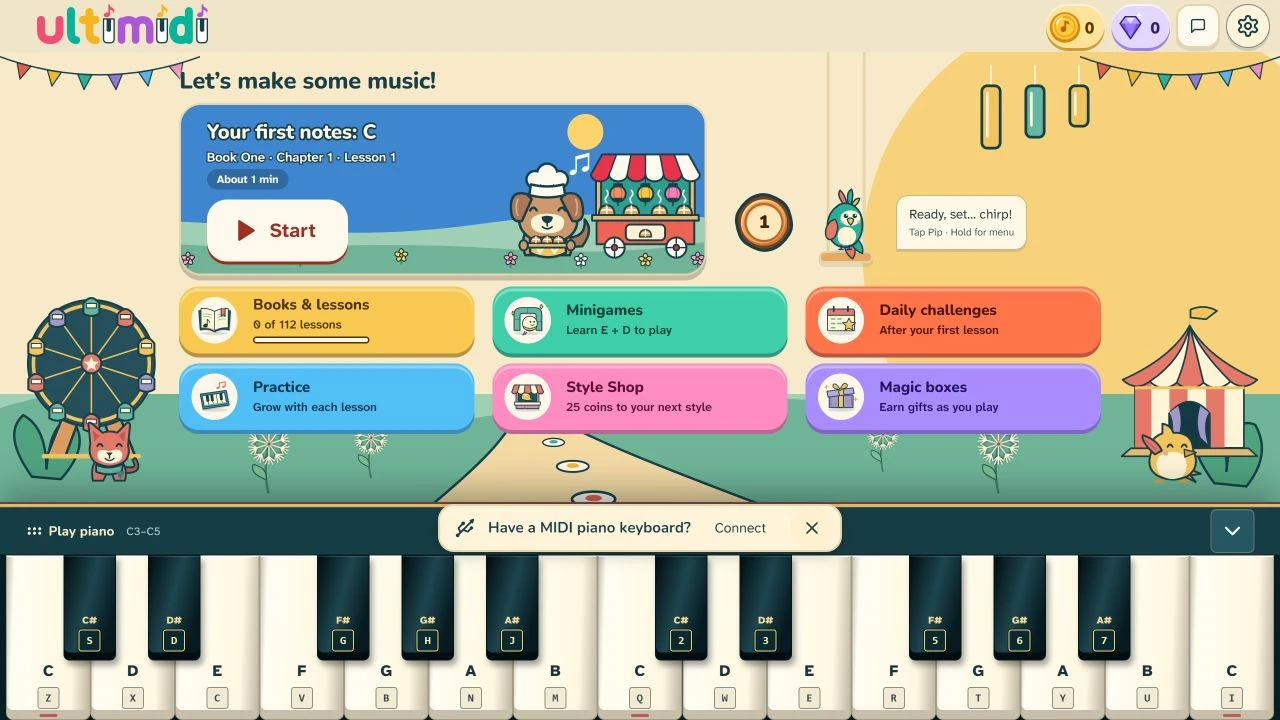
The current book library labels Book One as Free. Book Two, Book Three and Classics carry Pro labels. A lesson can also be locked because you must finish earlier lessons: that is different from a Pro label. Minigames open as you learn more notes, so a new player should start with the first lesson rather than expect every activity to be available immediately.
For this update, we opened the public game without signing in and checked the first lesson, results and book library on desktop. We did not connect a physical MIDI keyboard or compare long-term learning results. The screenshot shows the actual game, not a mock-up.
Will it work with your keyboard and device?
A browser loading successfully does not prove that it can receive MIDI. Web MIDI needs a supported browser and permission to access the device. Use the secure HTTPS game address.
- Windows, Mac or Linux computer: current Chrome, Edge and Opera support Web MIDI. Desktop Firefox supports it from version 108. Safari has no native support. Check the current browser support table for your exact browser.
- Android phone or tablet: Chrome and Samsung Internet support Web MIDI; Firefox for Android does not. For a USB keyboard, check that the device supports USB host/OTG and use a suitable adapter. Android’s documentation notes that USB host support is not guaranteed on every device. Follow your keyboard’s power requirements too.
- iPhone or iPad: standard browsers do not provide native Web MIDI support. You can try Ultimidi’s on-screen controls, but for a connected instrument, check a native piano app’s specific device support instead.
Check your keyboard’s manual for USB-MIDI or MIDI output. A headphone socket is not a MIDI connection. Use our MIDI keyboard connection guide for the cable and device steps. If you only want to explore the game now, start with the displayed computer-key labels.
Try this before you pay for a piano app
- Start one easy lesson. You should understand which note to play and when to release it without searching through a large library.
- Check the input. With your instrument connected, play one key and confirm that the matching note responds. Resolve missing input before judging the lesson.
- Repeat the difficult part. Try the slower option. Decide whether the feedback helps you explain a mistake, rather than only showing a score.
- Look away from the prompts. Play the short pattern again. If reading music is your goal, name the notes on the staff as well.
Computer keys and touch are useful for trying the interface, but they do not reproduce a piano’s key spacing or feel. MIDI messages also do not show which finger you used, your posture or hand tension. Keep a teacher or a suitable technique resource alongside game practice when you need help with those skills.
Want a longer first session after that trial? Follow our 15-minute MIDI piano practice plan. Start with one lesson you understand, then choose your next step from what you could actually play.